

Google
Google Customer Reviews
Revoser Teknik Servis266 · Rating from screenshot
These symptoms are not a definitive diagnosis. The device must be assessed.
When a laptop screen goes black, displays strange artifacts, or crashes under graphics load, the graphics card—often called the GPU—is a prime suspect. For independent repair shops in Ankara, diagnosing and repairing a faulty laptop GPU requires a careful, methodical approach.
Unlike desktop graphics cards, laptop GPUs are almost always soldered directly to the motherboard, making repair a delicate task that blends electronics diagnostics, micro-soldering, and thermal management. This article provides a practical guide for technicians and informed customers, focusing on what can be verified, what must be tested on the actual hardware, and where the limits of safe, independent repair lie.
Before any repair attempt, a thorough diagnostic process is essential. The first step is to confirm that the symptoms are indeed caused by the GPU and not by other components such as the display panel, LVDS cable, RAM, or power delivery system. A common mistake is to assume GPU failure when the issue is a loose display cable or a failing backlight.
To isolate the problem, connect the laptop to an external monitor. If the external display works normally while the internal screen shows artifacts or remains black, the issue is likely in the display assembly, not the GPU. If both screens show the same corruption, the GPU or its memory is a strong candidate.
Another useful test is to boot into a lightweight operating system from a USB drive. If the artifacts disappear in a non-accelerated mode, the problem may be driver-related rather than hardware. However, if the corruption persists even in the BIOS screen or during POST, the GPU hardware is almost certainly compromised.
Once the GPU is identified as the likely culprit, the next step is to determine whether the issue is a solder joint failure, a memory chip problem, or a die-level defect. Laptop GPUs are typically BGA (ball grid array) components, meaning they are attached to the motherboard via hundreds of tiny solder balls under the chip.
Over time, thermal cycling—repeated heating and cooling—can cause these solder joints to crack, especially in laptops with inadequate cooling. This is a known failure mode, but it is not a universal defect for any specific model. Each laptop must be evaluated individually. A technician can sometimes confirm a cracked solder joint by applying localized pressure to the GPU area while the laptop is running.
If the display flickers or recovers momentarily, a reflow or reball may be considered. However, this test is not definitive and should be performed with care to avoid short circuits.
For independent shops in Ankara, the most common service options for GPU issues are reflowing, reballing, and replacement. Each has distinct limitations and risks. Reflowing involves heating the GPU to remelt the solder balls without removing the chip. This can temporarily restore connections, but it is rarely a permanent fix.
The underlying stress on the solder joints remains, and the problem often returns within weeks or months. Reflowing also risks overheating adjacent components or warping the motherboard. Many reputable shops avoid reflow as a standalone service because of its low success rate and potential for collateral damage.
If a customer requests reflow, it is important to explain that this is a short-term measure and not a reliable repair.
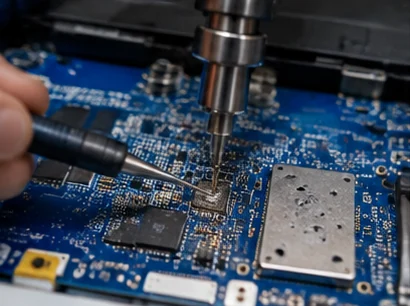
Reballing is a more thorough process. The GPU is removed from the motherboard, the old solder is cleaned off, new solder balls are applied to the chip, and it is reattached using a rework station. This addresses cracked joints directly and has a higher success rate than reflow.
However, reballing requires specialized equipment—a BGA rework station with precise temperature profiling, a stencil for the specific GPU package, and a microscope for inspection. It also demands significant skill. Even with proper equipment, there is always a risk of damaging the GPU die or the motherboard pads during removal.
The technician must verify the exact ball pattern and pitch of the original GPU, as these vary between chip models. There is no universal stencil. The original chip must be inspected under magnification to confirm the ball layout before ordering a stencil. No assumptions can be made based on the laptop model alone.
Replacement of the GPU is the most definitive solution, but it comes with its own set of challenges. A replacement chip must be sourced, and it must be identical to the original—same model number, stepping, and often the same firmware version. Even a slight variation can cause incompatibility, such as no display, incorrect resolution, or failure to initialize.
The replacement chip must also be new or verified working; used GPUs from unknown sources carry the same risk of failure as the original. Furthermore, the motherboard must be in good condition. If the original GPU failed due to a short circuit elsewhere, replacing the chip without addressing the root cause will result in another failure.
The technician must check for shorted power rails, blown capacitors, and damaged traces around the GPU before attempting replacement. This requires a multimeter and a schematic diagram for the specific motherboard. Without a schematic, the diagnostic process is limited to visual inspection and basic continuity checks.
Another critical factor is the thermal solution. A GPU that has failed due to overheating may have caused damage to the surrounding PCB or other components. Even after a successful reball or replacement, the laptop must have a properly functioning cooling system. The heatsink must be clean, the thermal paste must be applied correctly, and the fan must spin freely.
If the cooling system is compromised, the repaired GPU will likely fail again. The technician should always inspect the thermal pads and paste during disassembly and replace them if they are dried out or cracked. This is not a speculative upgrade; it is a necessary step to ensure the repair lasts.
For some laptops, GPU repair may not be economically viable. The cost of a replacement chip, combined with the labor time for reballing or replacement, can approach or exceed the value of the laptop. In such cases, the technician should offer alternative solutions. One option is to use the laptop with an external GPU (eGPU) via Thunderbolt or ExpressCard, if the laptop supports it.
This bypasses the internal GPU entirely and provides a new graphics capability. However, this requires a compatible port and a separate eGPU enclosure, which is an additional expense. Another option is to disable the internal GPU in the BIOS or operating system and rely solely on integrated graphics, if the CPU has an iGPU.
This is only possible if the laptop's display is wired to the iGPU, which is common in many modern laptops but not all. The technician can test this by booting with the dedicated GPU driver disabled. If the display works, the laptop can be used for basic tasks like web browsing and document editing, but not for gaming or GPU-intensive work.
It is also important to distinguish between GPU failure and VRAM failure. The graphics memory chips are separate from the GPU die and can fail independently. Symptoms of VRAM failure include specific patterns of artifacts, such as horizontal lines, checkerboard patterns, or corrupted textures in specific screen regions.
A technician can sometimes identify a faulty VRAM chip by running a memory test utility, such as those built into some GPU diagnostic tools. If a single VRAM chip is bad, it may be possible to replace just that chip rather than the entire GPU. This is less invasive and often less expensive.
However, the same sourcing and compatibility considerations apply: the replacement VRAM chip must match the original in speed, capacity, and package type. The technician must verify the markings on the original chip under magnification.
For independent shops in Ankara, there are additional logistical considerations. Sourcing replacement GPUs and VRAM chips locally can be difficult. Many parts must be ordered from international suppliers, which introduces shipping delays and the risk of receiving counterfeit or damaged components. The technician should always test the replacement chip in a known working motherboard before installing it in the customer's laptop, if possible.
This is not always feasible, but it reduces the chance of a failed repair due to a bad part. The customer should be informed of these risks and the estimated timeline before work begins.
Safety is paramount in GPU repair. Working with BGA components involves high temperatures—often over 200°C—and the use of flux, which can produce fumes. Proper ventilation, a fume extractor, and heat-resistant gloves are necessary. The technician must also be aware of the risk of electrostatic discharge (ESD) and use an ESD-safe workstation. The motherboard should be handled carefully to avoid bending or scratching the PCB.
Any repair that involves removing the GPU voids the manufacturer's warranty, but for out-of-warranty laptops, this is not a concern. However, the technician should always obtain written consent from the customer before proceeding with irreversible work.
Finally, it is essential to set realistic expectations. Not all GPU failures can be repaired. If the GPU die itself is cracked or shorted internally, no amount of reballing or replacement will fix it. In such cases, the only solution is a motherboard replacement, which is often cost-prohibitive.
The technician should be honest with the customer and recommend against spending money on a repair that has a low probability of success. A thorough diagnostic report, including photos of the damaged area and test results, helps the customer make an informed decision.
In summary, laptop graphics card repair in an independent Ankara shop requires a combination of diagnostic skill, specialized equipment, and honest communication. The technician must verify symptoms, isolate the faulty component, and choose the appropriate service option—reflow, reball, or replacement—based on the specific hardware and the customer's budget.
Each option has clear limitations, and no repair should be guaranteed without first testing the motherboard and sourcing verified parts. By following a disciplined process and explaining the risks and alternatives, an independent shop can provide valuable service while maintaining trust with its customers.
No. Panel, cable, driver, memory and power faults must also be considered.
Contact our Ankara service centre to confirm current DHL shipping and packaging conditions.
Visit our Ankara service centre or contact us about DHL shipping.
266 · Rating from screenshot
Haritayı yüklemek tarayıcınızı Google sunucularına bağlar ve çerez kullanımına neden olabilir.
Çerez PolitikasıEti Mah. Toros Sok. No:41/A, Sıhhiye, Çankaya / Ankara
Visit our Ankara repair centre or contact us about nationwide DHL shipping.