

Google
Google Customer Reviews
Revoser Teknik Servis266 · Rating from screenshot
These symptoms are not a definitive diagnosis. The device must be assessed.
Hinge and chassis faults are among the most physically disruptive issues a laptop can develop. Unlike a software glitch or a failed battery, a broken hinge or a cracked casing directly affects how you hold, open, and transport the machine. For a laptop repair business operating in Ankara, these repairs are frequent and technically demanding.
The hinge and chassis assembly is not merely a cosmetic shell; it is a precision mechanical system that must withstand thousands of open-close cycles while protecting the delicate display and internal components. Understanding the engineering, the failure modes, and the diagnostic approach is essential for anyone seeking a lasting repair.
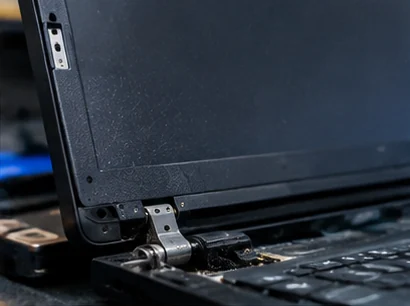
The hinge mechanism on a modern laptop is a deceptively complex component. It is typically a torsion-based assembly, consisting of a metal barrel, a central pin, and multiple friction washers or leaf springs.
These parts are designed to provide a specific amount of resistance, known as torque, so that the display stays at the desired angle without flopping forward or requiring excessive force to move. The hinge is anchored to the display back cover, often called the lid or A-cover, and to the base chassis, the C-cover or D-cover assembly.
The attachment points are usually small metal brackets that are either screwed into plastic bosses or, in many thin and light designs, riveted or spot-welded directly to the magnesium or aluminum frame.
The most common failure is hinge binding or seizing. Over time, the lubricant inside the hinge barrel dries out or becomes contaminated with dust and debris. The friction washers wear down, and the metal surfaces can gall against each other. When a hinge becomes too stiff, the plastic mounting points in the chassis cannot handle the increased torque.
The result is a cracked palm rest, a broken display bezel, or a hinge bracket that has torn completely out of its plastic housing. This is the classic scenario where a user opens the laptop and hears a cracking sound, followed by the display feeling loose or the chassis visibly splitting apart.
Symptoms of hinge and chassis damage are usually obvious but can be subtle in the early stages. The first sign is often a change in the smoothness of the opening motion. A healthy hinge should offer consistent, even resistance from the closed position to the fully open angle.
If you feel a catch, a grinding sensation, or a point where the hinge suddenly becomes much harder to move, the mechanism is beginning to fail. Another early symptom is a slight wobble in the display when the laptop is on a flat surface.
If the screen shakes or vibrates more than usual when you type, the hinge may have developed play, meaning the friction is no longer holding the assembly securely.
As the damage progresses, you will see physical deformation of the chassis. The most common location is the area around the hinge caps, which are the small plastic covers that bridge the gap between the display and the base. Cracks will appear in the palm rest, usually near the hinge pivot point. A damaged hinge mount may separate the chassis near the hinge.
However, swelling around the bottom cover, keyboard or touchpad may also indicate a swollen battery. If battery swelling is suspected, stop using or charging the laptop, safely disconnect external power and avoid pressing on the affected area before arranging an assessment. In severe cases, the display cable, which runs through the hinge barrel, can be pinched or severed.
This leads to display flickering, lines on the screen, or a complete loss of video. The webcam cable and wireless antenna wires also pass through this area, so hinge damage can cause camera failures or degraded Wi-Fi performance.
Diagnosing a hinge or chassis fault requires a methodical approach. The first step is to determine whether the hinge itself is the problem or if the chassis has failed around a functional hinge. Open the laptop slowly and observe the movement. If the hinge moves freely but the display does not stay in position, the hinge has lost its friction.
This is less common than binding but does occur, especially on older models where the internal grease has thinned out. If the hinge is stiff, do not force it. Forcing a stiff hinge is the primary cause of chassis cracking. Instead, note the exact location of the resistance. Is it in the left hinge, the right hinge, or both?
Many laptops use two hinges, and they can fail independently.
Next, inspect the chassis for cracks. Run your finger along the edges of the palm rest and the bottom cover. Look for hairline fractures near the hinge caps. Gently press on the areas around the hinges. If you see the plastic flexing or hear a creaking sound, the mounting points are compromised.
On some designs, the hinge bracket is screwed into a metal insert that is molded into the plastic. If the plastic around the insert cracks, the screw will no longer hold, and the hinge will pull away from the chassis. This is a common failure on laptops with a single large hinge that spans the entire width of the display.
A critical diagnostic step is to check the display cable. Even if the screen is working, a damaged cable can cause intermittent issues. Open and close the laptop slowly while watching the display. If you see flickering or color shifts at specific angles, the cable is likely being pinched or stretched by the faulty hinge.
This is a strong indicator that the hinge assembly has shifted out of alignment. In some cases, the hinge barrel itself can rotate and crush the cable against the chassis frame.
Once the fault is identified, the repair approach depends on the severity of the damage and the specific laptop model. For a hinge that has lost its friction, the repair is often straightforward. The hinge assembly must be removed from the laptop, cleaned of old grease, and re-lubricated with a high-viscosity synthetic grease. The friction washers may need to be tightened or replaced.
This is a delicate operation because the hinge is under spring tension. Disassembling a hinge without the proper tools and experience can result in the pin shooting out or the washers scattering. It is not a repair that should be attempted by someone without mechanical experience.
For a seized hinge, the situation is more complex. If the hinge is still intact but the chassis has cracked, the repair involves both replacing or repairing the hinge and reinforcing the chassis. The cracked plastic must be stabilized. In many cases, the plastic can be bonded using a two-part epoxy or a specialized plastic welding technique.
The mounting points can be reinforced with metal brackets or by embedding new threaded inserts. This is not a cosmetic fix; it is a structural repair that must restore the original strength of the chassis. If the hinge bracket has torn out completely, the plastic may need to be rebuilt with a filler material before the hinge can be reattached.
In some situations, the chassis damage is too extensive for a reliable repair. Large cracks that extend across the palm rest, broken screw posts, or shattered bottom covers often require a full chassis replacement. This is a major disassembly job. The entire laptop must be taken apart, and all components must be transferred to a new chassis.
This includes the motherboard, keyboard, touchpad, speakers, battery, and all internal cabling. The display assembly must also be removed and transferred. This is a time-intensive process that requires careful documentation of screw sizes and cable routing. It is also a repair that demands a high level of precision, as improper reassembly can lead to grounding issues, poor thermal contact, or misaligned ports.
The hinge itself may also need to be replaced. Hinges are model-specific. They are not universal parts. The torque rating, the barrel diameter, the length, and the mounting bracket geometry are all unique to each laptop design. Using a hinge from a different model will result in improper fit, incorrect opening angle, or excessive stress on the chassis.
When replacing a hinge, the new part must be an exact match. The replacement hinge should be tested for smooth operation before installation. It should be lubricated and adjusted to the correct torque specification if possible.
Shipping a laptop for hinge and chassis repair is a viable option for customers who cannot visit the repair center in Ankara. The laptop must be packaged securely. The display is the most vulnerable component during shipping, especially if the chassis is already cracked. The laptop should be placed in a rigid box with at least two inches of foam padding on all sides.
The power adapter and any accessories should be packed separately. It is important to remove any loose items from the laptop bag, such as USB drives or pens, that could shift and damage the screen. The customer should clearly describe the symptoms and the observed damage when shipping the unit.
This allows the technician to prepare the necessary replacement parts before the laptop arrives, reducing turnaround time.
Direct service at the repair center in Ankara offers the advantage of an immediate physical inspection. The technician can open the laptop on the counter, feel the hinge resistance, and identify hairline cracks that might not be visible in photographs. This in-person assessment is the most accurate way to determine whether a hinge can be repaired or if a full chassis replacement is necessary.
The customer can also see the damage firsthand and discuss the repair options directly. For complex cases, such as a laptop that has been dropped and has both hinge and chassis damage, a physical inspection is essential to check for hidden damage to the display panel, the LCD bracket, or the motherboard mounting points.
One of the most common misconceptions about hinge and chassis repair is that it is purely cosmetic. This is not true. A cracked chassis compromises the structural integrity of the laptop. The keyboard and palm rest may flex, causing the touchpad to malfunction or the keyboard to feel spongy.
The display may no longer align properly with the base, leading to uneven gaps that allow dust and debris to enter. Over time, a loose hinge can cause the display cable to wear through, resulting in a costly screen replacement. Addressing hinge and chassis issues early prevents these secondary failures.
Another misconception is that superglue or tape can fix a cracked chassis. These temporary fixes almost always fail. Superglue is brittle and cannot withstand the repeated stress of opening and closing the laptop. Tape does not provide any structural support.
A proper repair requires cleaning the crack, applying a suitable adhesive or welding the plastic, and reinforcing the area with a metal or plastic brace. The repair must be allowed to cure fully before the hinge is reinstalled. Rushing this process will result in the crack reappearing within days.
The materials used in laptop chassis vary widely. Budget laptops often use ABS plastic, which is prone to cracking and fatigue. Mid-range and premium laptops use polycarbonate blends, carbon fiber reinforced polymers, or magnesium alloys. Each material requires a different repair approach. ABS plastic can be chemically welded using a solvent like acetone or MEK, which melts the plastic and fuses the crack.
Polycarbonate requires a different solvent or a two-part epoxy. Magnesium alloy cracks can be welded with a TIG welder, but this is a specialized skill and is rarely cost-effective for consumer laptops. In most cases, a cracked magnesium chassis is replaced rather than repaired.
The hinge design also varies by manufacturer. Some laptops use a single, wide hinge that is mounted to the center of the display. This design distributes the load over a larger area and is less prone to cracking the chassis. Other laptops use two small hinges mounted at the far edges of the display.
This design concentrates the stress on two small points, making the chassis more vulnerable to cracking. Ultrabooks and thin-and-light laptops are particularly susceptible because the chassis is made of thin plastic or metal to reduce weight. The hinges on these laptops are often very stiff to hold the heavy display in place, which increases the risk of chassis damage.
The repair process for a hinge and chassis issue follows a general sequence, though the exact steps vary by model. The first step is to remove the bottom cover and disconnect the battery. This is a safety precaution to prevent electrical shorts and to protect the motherboard. Next, the display assembly is removed from the base.
This involves disconnecting the display cable, the webcam cable, and the wireless antenna cables. The hinge screws are then removed from the base chassis. In many cases, the hinge is also screwed to the display back cover. The display bezel must be removed to access these screws. The bezel is usually held on by plastic clips and adhesive.
It must be pried off carefully to avoid breaking the clips.
Once the display is separated from the base, the hinge can be inspected. If the hinge is seized, it may need to be soaked in a penetrating oil to loosen the internal components. If the hinge is damaged beyond repair, it is replaced. The chassis is then repaired or replaced.
If the chassis is being repaired, the cracked area is cleaned, and the adhesive or welding material is applied. The repair is clamped and left to cure. If the chassis is being replaced, all components are transferred to the new chassis. This is a reverse of the disassembly process.
Reassembly must be done with care. The hinge screws must be tightened to the correct torque. Over-tightening can strip the threads or crack the plastic. Under-tightening will allow the hinge to move and cause the damage to recur. The display cable must be routed correctly to avoid pinching. The wireless antenna cables must be connected and secured.
The display bezel must be snapped into place evenly. Any adhesive strips must be replaced to ensure the bezel stays flush.
After the repair, the laptop should be tested thoroughly. The hinge should be opened and closed multiple times to ensure smooth operation. The display should be checked for flickering or dead pixels. The webcam and microphone should be tested. The Wi-Fi should be tested to ensure the antenna connections are secure. The chassis should be inspected for any gaps or flex.
The laptop should be placed on a flat surface and the display should remain at the set angle without drifting.
For customers in Ankara, bringing the laptop to the repair center allows for this full testing cycle. For customers who ship their laptop, the repaired unit is tested before it is returned. The packaging for the return shipment is just as important as the initial packaging. The laptop should be protected with the same level of care to prevent damage during transit.
Hinge and chassis repair is one of the most technically demanding services in laptop repair. It requires an understanding of mechanical engineering, material science, and precision assembly. It is not a repair that can be rushed or done with generic parts. Each repair is specific to the laptop model and the nature of the damage.
A successful repair restores the laptop to its original functionality and prevents further damage to the display and internal components. It extends the life of the laptop and saves the customer the cost of a replacement. For a laptop repair business in Ankara, providing this service with technical accuracy and attention to detail is a core part of the value offered to customers.
Mount repair or replacement of the affected chassis part depends on the damage.
Contact our Ankara service centre to confirm current DHL shipping and packaging conditions.
Visit our Ankara service centre or contact us about DHL shipping.
266 · Rating from screenshot
Haritayı yüklemek tarayıcınızı Google sunucularına bağlar ve çerez kullanımına neden olabilir.
Çerez PolitikasıEti Mah. Toros Sok. No:41/A, Sıhhiye, Çankaya / Ankara
Visit our Ankara repair centre or contact us about nationwide DHL shipping.