

Google
Google Customer Reviews
Revoser Teknik Servis266 · Rating from screenshot
These symptoms are not a definitive diagnosis. The device must be assessed.
When your laptop keyboard begins to fail, the entire machine can feel unusable. A single stuck key, a row of unresponsive letters, or a keycap that has popped off and refuses to snap back into place can bring your work, studies, or daily communication to a halt.
For many users in Ankara, the immediate reaction is to connect an external USB keyboard and continue working. While this is a functional temporary fix, it defeats the purpose of owning a portable computer. The keyboard is your primary interface with the machine, and when it malfunctions, the laptop loses its core identity as a self-contained, mobile device.
This article is written for laptop owners in Ankara who are facing keyboard issues and are considering their options. We will explore the diagnostic process, explain why keyboard replacement is often the only safe and reliable solution, and outline what you should expect from a professional repair service.
Whether you are in Çankaya, Keçiören, Yenimahalle, or any other district, understanding the nuances of this repair will help you make an informed decision.
The first step in addressing a keyboard problem is accurate diagnosis. Not every keyboard issue is a hardware failure. Sometimes, the problem lies within the software or the operating system. Before you assume that your keyboard needs to be replaced, it is wise to rule out software-related causes.
A common culprit is a stuck or misconfigured filter key, sticky key, or toggle key setting in Windows or macOS. These accessibility features can alter how your keyboard responds, making it seem as though certain keys are not working or are repeating unexpectedly. Another software issue can be an outdated or corrupted keyboard driver.
In Windows, you can check the Device Manager to see if the keyboard driver is flagged with a yellow exclamation mark. Uninstalling the driver and restarting the laptop often forces the system to reinstall a fresh copy, which can resolve erratic behavior. Similarly, a virus or malware infection can sometimes interfere with keyboard input.
Running a full system scan with a reputable antivirus program is a prudent step.
Another software-related scenario involves the operating system’s language and input settings. If you have accidentally switched the keyboard layout from Turkish Q to Turkish F, or to a completely different language, the keys will not produce the expected characters. This is not a hardware failure, but a simple configuration error that can be corrected in the system settings.
For macOS users, checking the Input Sources in System Preferences is the equivalent step. If you have recently installed new software or performed a system update, a rollback or a clean boot can help isolate whether the keyboard issue is caused by a software conflict. We strongly recommend that you attempt these software checks before concluding that the keyboard itself is defective.
A professional repair service in Ankara will also perform these checks as part of their initial evaluation. A reputable technician will not immediately recommend a costly replacement without first verifying that the problem is not software-based.
If you have exhausted all software troubleshooting steps and the problem persists, the issue is almost certainly hardware-related. However, even within the hardware domain, there are different levels of severity. A common problem is physical debris lodged beneath the keycap. Crumbs, dust, hair, and sticky liquid residue can prevent a key from making proper contact with the membrane or scissor-switch mechanism.
In some cases, a careful cleaning using compressed air or a specialized keycap puller can resolve the issue. If you are comfortable doing so, you can remove the affected keycap (with caution, as some laptop keycaps are fragile and have delicate retaining clips) and clean the area underneath. For liquid spills, the situation is more critical.
Even if the keyboard appears to work immediately after a spill, the conductive traces on the keyboard membrane can corrode over time, leading to intermittent failures or complete loss of function. Once liquid has entered the keyboard assembly, the damage is often progressive. Cleaning the surface is not enough; the internal layers of the keyboard may have already begun to degrade.
Another hardware issue that is often mistaken for a keyboard failure is a problem with the keyboard ribbon cable or its connector on the motherboard. The ribbon cable is a thin, flexible strip that carries signals from the keyboard to the laptop’s main board.
If this cable becomes loose, pinched, or partially torn, the keyboard may exhibit strange behavior, such as certain rows of keys working while others do not, or the keyboard working only when the laptop is held at a specific angle. In some laptop models, the keyboard connector is a simple latch that can be reseated.
However, accessing this connector requires opening the laptop, which is not a trivial task for most users. The internal layout varies greatly between brands and models. For example, a Lenovo ThinkPad has a completely different disassembly procedure compared to an Asus ROG or a MacBook Pro.
Attempting to open the laptop without proper tools, an anti-static workspace, and a service manual can lead to accidental damage to the motherboard, the trackpad cable, or the delicate plastic clips that hold the palm rest in place. This is where the value of a professional repair service becomes clear.
A technician in Ankara who has experience with your specific laptop model will know exactly how to access the keyboard connector safely.
If the keyboard itself is confirmed to be defective, replacement is the only viable long-term solution. There is no reliable way to repair a faulty keyboard membrane or a broken scissor-switch mechanism at the component level. Some online tutorials suggest soldering individual switches, but this is impractical for modern laptop keyboards, which are often a single, sealed unit.
The membrane layers are laminated together, and attempting to separate them for repair almost always results in further damage. Furthermore, the keycaps and mechanisms are often proprietary and not available as individual replacement parts. Even if you could find a single keycap, the underlying mechanism may be worn out. The only safe and durable solution is to replace the entire keyboard assembly.
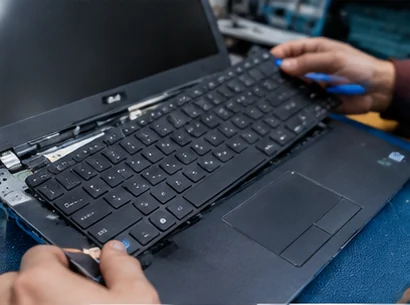
The process of keyboard replacement varies significantly depending on the laptop model. In the past, many laptops had keyboards that were held in place by a few screws on the bottom panel and could be removed from the top. Today, the trend is toward integrated designs where the keyboard is riveted or glued into the top case or palm rest assembly.
For these models, replacing the keyboard often requires replacing the entire top case, which includes the keyboard, trackpad, and sometimes the fingerprint reader. This is a more expensive and labor-intensive repair, but it is the correct procedure for many modern ultrabooks and premium laptops.
A professional repair service will have access to the correct service manuals and will know whether your laptop requires a simple keyboard swap or a full top case replacement. Attempting to pry a riveted keyboard out of a metal chassis without the proper tools can bend the chassis, damage the trackpad, or break the mounting points, rendering the laptop unusable.
Another critical consideration is the source of the replacement keyboard. There is a significant difference between an original OEM (Original Equipment Manufacturer) part and a generic or used keyboard. An OEM keyboard is manufactured to the exact specifications of the laptop brand.
It will have the correct keycap profile, backlighting compatibility (if your laptop has a backlit keyboard), and the proper ribbon cable length and connector orientation. A generic or compatible keyboard may be significantly cheaper, but it often comes with compromises. The key feel may be different, the printing on the keycaps may fade quickly, and the backlighting may be uneven or non-functional.
In some cases, a generic keyboard may not fit perfectly, leaving gaps around the edges or causing the palm rest to sit unevenly. A used keyboard, salvaged from another laptop, carries the risk of unknown wear and tear. It may have been exposed to liquid, dust, or heavy use. While a used part can be a budget-friendly option, it is a gamble.
A reputable repair service in Ankara will be transparent about the type of part they are using and will offer you a choice based on your budget and expectations. They should also stand behind their work with a warranty on both the part and the labor.
For laptop owners in Ankara who are considering a DIY repair, it is important to weigh the risks. The cost of a replacement keyboard can range from moderate to high, depending on the model. If you purchase the wrong part, or if you damage the ribbon cable during installation, you will have wasted both time and money.
Furthermore, many online sellers do not accept returns on opened electronic components. The tools required for the job are also specific. You will need a set of precision screwdrivers, plastic spudgers for prying open the case, and possibly a heat gun or iOpener for models where the keyboard is glued in.
You also need an anti-static wrist strap to prevent electrostatic discharge from damaging sensitive components. One slip of a screwdriver can scratch the motherboard or short out a circuit. For a business user or a student who relies on their laptop daily, the downtime caused by a failed DIY attempt can be more costly than the repair itself.
This is where a professional laptop repair service in Ankara provides immense value. A skilled technician can complete a keyboard replacement in a fraction of the time it would take an inexperienced user. They have a stock of common parts, access to service manuals, and the experience to handle unexpected complications, such as stripped screws, broken plastic clips, or stubborn adhesive.
They also have the diagnostic equipment to verify that the new keyboard is functioning correctly before reassembling the laptop. This includes testing every key, checking the backlight function, and ensuring that the trackpad and other integrated components are working properly.
A professional service will also clean the interior of the laptop while it is open, removing dust from the fan and heatsink, which can improve overall system performance and longevity.
For customers in Ankara who are unable to visit the repair shop in person, a nationwide cargo service is a convenient alternative. The process is straightforward. You package your laptop securely in a padded box, include a note describing the issue and your contact information, and ship it to the repair center.
The technician will diagnose the problem, contact you with a quote, and proceed with the repair only after receiving your approval. Once the repair is complete, the laptop is tested thoroughly and shipped back to you.
This service is particularly useful for professionals and students who are based outside of Ankara or who have a busy schedule that makes it difficult to visit a physical location. It is also a safe option, as reputable repair services insure the package during transit and use trackable shipping methods.
When choosing a repair service in Ankara, there are several factors to consider. First, look for a service that specializes in laptop repairs rather than a general electronics shop. Laptop keyboards are delicate and model-specific, and a specialist will have the necessary experience. Second, ask about the warranty.
A standard warranty for a keyboard replacement is typically three to six months, covering both the part and the labor. A longer warranty is a sign of confidence in the quality of the work and the parts used. Third, inquire about the turnaround time. A simple keyboard replacement can often be completed within a few hours if the part is in stock.
For models that require a top case replacement, the repair may take one to two business days. A professional service will give you a realistic estimate and keep you informed of any delays. Fourth, read reviews or ask for references. Word of mouth is powerful in a city like Ankara, and a service with a strong reputation for honesty and quality is worth seeking out.
It is also important to understand what a keyboard replacement does not include. Replacing the keyboard will not fix a laptop that has other underlying issues, such as a damaged motherboard, a faulty trackpad, or a broken screen. If your laptop was dropped or suffered a significant liquid spill, the keyboard failure may be just one symptom of a larger problem.
A thorough diagnostic check is essential to identify all issues before proceeding with any repair. A good technician will explain the full condition of your laptop and provide a comprehensive repair plan, rather than simply replacing the keyboard and ignoring other problems.
Another aspect to consider is the environmental impact of keyboard replacement. Instead of discarding an entire laptop because of a few broken keys, replacing the keyboard extends the life of the machine. This is a more sustainable choice than buying a new laptop. Many components in a laptop, such as the processor, RAM, and storage, have a lifespan that far exceeds the keyboard.
By investing in a keyboard replacement, you are reducing electronic waste and getting more value from your original purchase. This is a responsible choice for both your wallet and the environment.
In conclusion, a faulty laptop keyboard is a frustrating but solvable problem. The key is to approach the issue methodically. Start with software diagnostics to rule out configuration errors or driver issues. If the problem is hardware, consider the possibility of debris or a loose cable before concluding that the keyboard itself is dead.
Once a keyboard failure is confirmed, replacement is the only reliable solution. The complexity of the replacement depends on your laptop model, and the choice between a DIY repair and a professional service should be based on your technical skill, available tools, and tolerance for risk.
For most users, the safest and most cost-effective option is to entrust the repair to a professional laptop repair service in Ankara. Whether you visit the shop in person or use the nationwide cargo service, you can expect a thorough diagnosis, quality parts, and a warranty on the work.
A properly replaced keyboard will restore your laptop to full functionality, allowing you to work, study, and communicate without the burden of a broken input device. Do not let a few faulty keys dictate the fate of your entire machine. With the right approach and the right service provider, your laptop can be back in action quickly and reliably.
Some models integrate the keyboard into the top case; the design determines the repair.
Contact our Ankara service centre to confirm current DHL shipping and packaging conditions.
Visit our Ankara service centre or contact us about DHL shipping.
266 · Rating from screenshot
Haritayı yüklemek tarayıcınızı Google sunucularına bağlar ve çerez kullanımına neden olabilir.
Çerez PolitikasıEti Mah. Toros Sok. No:41/A, Sıhhiye, Çankaya / Ankara
Visit our Ankara repair centre or contact us about nationwide DHL shipping.