

Google
Google Customer Reviews
Revoser Teknik Servis266 · Rating from screenshot
These symptoms are not a definitive diagnosis. The device must be assessed.
Laptop charging port repair and diagnosis
A laptop that charges only at certain cable angles, intermittently loses external power or does not recognise the charger may have a damaged charging connector. However, a similar symptom can originate from the adapter, cable, battery or motherboard power-management circuits. Correct diagnosis should precede replacement.
How laptop power input works
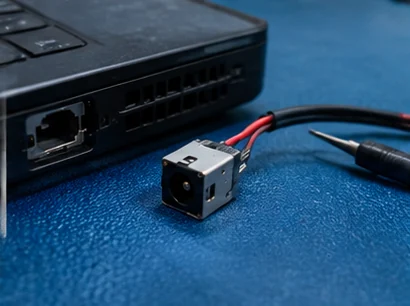
The charging connector provides a physical and electrical connection between a compatible external power supply and the laptop. It does not itself necessarily regulate voltage; charging and protection functions are generally handled by associated electronic circuits. Barrel-style DC jacks may be mounted on a cable assembly, daughterboard or directly on the motherboard. Some designs include an identification contact.
USB-C charging systems use compatible power delivery negotiation and may involve a dedicated controller and protection circuitry.
Signs of a faulty charging connector
A visibly loose port, intermittent charging, a damaged centre contact, physical distortion or heat near the connector can indicate a problem. An adapter warning or a battery that refuses to charge is not conclusive evidence of a defective port. On some laptops, the device operates from the charger while battery charging is disabled because the adapter is not recognised.
On USB-C models, cable capabilities and supported charging profiles also matter.
Safe checks before service
Inspect the charger, plug and cable for visible damage. Verify that the adapter is compatible with the exact model. If available, test a known-working compatible charger and cable. Do not force the plug, repeatedly bend it to maintain contact or insert metal tools into the socket. Stop using equipment that smells burnt, shows sparking or becomes unusually hot.
A swollen or damaged battery requires professional handling. Do not open a mains-powered adapter.
Technical diagnosis of the DC input and power circuit
A technician can inspect the connector, cable assembly and motherboard for broken solder joints, corrosion, damaged contacts or mechanical stress. Electrical checks may include verifying adapter output, continuity and the relevant input power path. The appropriate measurement points and expected values depend on the motherboard design. For USB-C charging, the power delivery controller, supported negotiation and surrounding circuitry may need investigation.
A failed input MOSFET, protection component or charging controller can prevent charging even when the connector is intact. Conversely, a damaged jack may interrupt power without any fault in the charging controller. Replacing parts solely on the basis of a symptom can leave the original problem unresolved.
Charging port replacement options
A cable-connected DC jack can sometimes be replaced as an assembly. A board-mounted connector may require controlled soldering or rework, particularly where the board has large ground planes or closely spaced components. USB-C connectors have fine contacts and may require specialised equipment and careful inspection of pads and traces. Damage extending into the motherboard can require additional board-level repair.
The procedure must be selected after identifying the exact connector and board construction.
Power isolation and final tests
Internal work requires disconnecting external power and safely isolating the battery. Appropriate electrostatic protection and model-specific service procedures are important. A technician should inspect the repaired connector for secure attachment, correct alignment and damage to nearby components. After repair, verify adapter recognition where applicable, stable external power, battery charging and normal operation under a suitable workload.
If the fault persists, investigate the remaining power path rather than assuming a second connector is required.
Charging port repair costs in Ankara
The price depends on the device model, connector type, whether it is a separate assembly or soldered component, the condition of the motherboard and available parts. A simple cable assembly replacement and a damaged USB-C port requiring board repair may involve very different labour requirements. The estimate is established after diagnosis.
Contact our independent centre with the full model and a description of the charging behaviour. Customers outside Ankara can confirm DHL shipping conditions before dispatch.
Frequently asked questions
Does a laptop that charges only when the plug is moved need a new socket? Not necessarily. The plug, cable and connector assembly should be examined to identify the source of intermittent contact.
Can a charging port be repaired without replacing the motherboard? In many designs a connector or cable assembly can be replaced, but the feasibility depends on board damage and the availability of suitable components.
Will charging port repair erase my files? The charging connector is not the storage device. Nevertheless, back up important data where possible and discuss any data-sensitive work before repair.
Are all USB-C ports suitable for charging? No. Support varies by model and port. Consult the device specifications and use a compatible charger and cable.
We provide independent laptop repair in Ankara and are not a manufacturer-authorised service centre.
Adapter, cable, connector and motherboard charging circuit must be assessed.
Contact our Ankara service centre to confirm current DHL shipping and packaging conditions.
Visit our Ankara service centre or contact us about DHL shipping.
266 · Rating from screenshot
Haritayı yüklemek tarayıcınızı Google sunucularına bağlar ve çerez kullanımına neden olabilir.
Çerez PolitikasıEti Mah. Toros Sok. No:41/A, Sıhhiye, Çankaya / Ankara
Visit our Ankara repair centre or contact us about nationwide DHL shipping.