

Google
Google Customer Reviews
Revoser Teknik Servis266 · Rating from screenshot
These symptoms are not a definitive diagnosis. The device must be assessed.
In the digital age, every file, photograph, project, or financial record carries critical value for the user. With the widespread use of laptops, cases of data loss in Ankara have also increased. Access to important data can be interrupted due to hardware crashes, user errors, software corruption, or physical impacts.
This article examines the technical information and fault diagnosis methods involved in the laptop data recovery process separately, aiming to create a comprehensive resource for users in Ankara.
Data loss does not always occur in the same way. Different recovery strategies are applied depending on the source of the damage. There are two main categories: physical damage and logical errors.
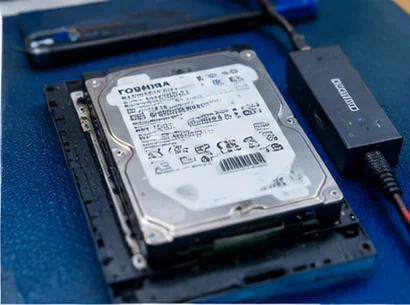
A hard disk drive (HDD) consists of mechanical parts. Rotating platters, moving head arms, a motor, and the magnetic medium can wear out over time. Drops, bumps, liquid contact, or excessive heat can damage these components. Symptoms of physical damage include the disk not spinning, clicking sounds, whirring noises, or read/write failures.
Solid State Drives (SSD) are more resistant to physical damage, but their electrical components, such as the controller and NAND chips, or connection points can be damaged.
Logical errors prevent access to data without any physical deterioration. Examples include accidental deletion or formatting, file system corruption, boot sector damage or partition table loss, virus or ransomware attacks, data writing during a power outage, and volumes that cannot be opened due to an operating system crash.
In these situations, the disk itself may be healthy, but the operating system does not recognize it. Solutions are possible with data recovery software or file system repair tools.
Understanding the technical details that form the basis of the recovery process determines which methods will work.
HDDs consist of platters coated with a magnetic layer where data is recorded in units called sectors, a head assembly that reads and writes magnetic fields without touching the platter surface, a spindle motor that rotates the platters, and a printed circuit board (PCB) that acts as the electronic brain, managing firmware, motor control, and communication with the computer.
A PCB failure can cause the disk to be completely unrecognized.
SSDs store data in NAND flash chips, which are transistor-based cells that can be electrically erased and written to. The cell type affects durability and performance. The controller manages access to the NAND chips and performs wear leveling and error correction. If the controller fails, direct access to the data is not possible.
The TRIM command allows the operating system to mark deleted data blocks as empty, and the SSD controller cleans these blocks in the background. Therefore, even if deleted files are not immediately overwritten, the recovery probability decreases if TRIM has been applied.
The operating system uses a file system to manage files. NTFS contains a Master File Table (MFT). When a file is deleted, the relevant record is marked as deleted, but the data blocks generally remain on the disk until overwritten. FAT32 and exFAT use a simpler table structure. Data recovery software scans these tables to trace deleted files.
APFS and ext4 have similar mechanisms, but each has differences in terms of recovery.
When faced with laptop data loss, correctly identifying the source of the fault is the first and most critical step. Care must be taken during the following diagnostic procedures to avoid damaging the disk. For HDDs, sound evaluation is important. Clicking indicates the head arms hitting the platters or failing to find the stopping point, a sign of mechanical failure.
Whirring or humming suggests problems with the motor. Scratching sounds indicate physical contact between the head and the platter surface, which is an emergency. Silence means the disk is not spinning at all, pointing to a PCB or motor power issue.
Check whether the disk appears in the BIOS screen when the laptop is turned on. If it does not appear, there may be a physical connection, PCB, or firmware error. If the operating system boots but the disk icon is not visible, a logical error or driver issue should be considered.
If a partition appears in Disk Management but is marked as RAW, the file system is corrupted. The laptop disk can be removed and tested by connecting it to another computer via an external adapter or USB enclosure. However, continuing to run the disk during this process can increase physical damage; especially if there is a clicking sound, power should not be applied.
Modern hard drives and SSDs report their own health status through S.M.A.R.T. parameters. Values such as Reallocated Sector Count, Current Pending Sector, and UltraDMA CRC Error Count provide insight into the level of disk degradation. Users in Ankara can perform a quick preliminary assessment with free S.M.A.R.T. reader software. However, this data may not always be reliable in cases of physical damage.
The recovery method applied varies according to the type of fault. In cases where the disk is physically healthy, data recovery software is used.
The process involves creating a sector-by-sector forensic image of the original disk to avoid further damage, analyzing the file system on the image to scan for deleted file records and residual sectors, and then recovering the files to a different physical medium.
Common software types include Recuva for basic needs, R-Studio for advanced scanning and RAID support, DMDE for partition recovery, and TestDisk for boot sector repair. Each software may perform differently on different file systems.
Recovering a physically damaged disk requires specialized hardware and cleanroom conditions. Professional services in Ankara perform these operations. Techniques include PCB replacement and ROM dump, where the faulty PCB is replaced with a matching healthy board, and the unique firmware ROM chip is transferred.
Head stack replacement involves replacing a clicking head assembly with a healthy one from the same model and production series, performed in a Class 100 or cleaner environment to prevent dust contamination. Platter transfer is used when platters are scratched or the head is stuck to the platter; the platters are removed with special tools in a cleanroom and transferred to another mechanical unit.
For SSDs, when the controller fails, the NAND chips are removed and read directly with a programmer, and the data is then combined using software. In cases of liquid damage, the PCB and connection points are cleaned with special chemicals to remove corrosion, and electrical traces on the motherboard can be repaired.
Incorrect steps in the data recovery process can make the damage permanent. Continuing to power a clicking disk can scratch the platter surface, leading to complete data loss. Writing new data to the sectors where a deleted file resides is irreversible; the computer with the disk installed should not be used normally.
Running recovery software on a disk suspected of physical damage can stress the disk further and worsen the fault. Directly applying voltage to the controller chip or NAND chips on an SSD is dangerous and should not be attempted by users.
In case of liquid spillage, immediately powering the device can cause a short circuit; the laptop should be turned off, the battery removed, and a service should be consulted without leaving the disk to dry.
Technical services operating in Ankara manage data recovery requests with a specific procedure. The general stages include an initial inspection where the laptop is physically received, the disk type and damage symptoms are recorded, and a free or low-cost preliminary diagnosis is offered.
A detailed laboratory diagnosis follows, which may involve opening the disk under cleanroom conditions and performing electronic tests, resulting in a diagnostic report. The recovery method is then decided, and a price quote is presented to the customer. After customer approval, operations such as imaging, repair, or head replacement begin.
Finally, the recovered files are copied to an external disk or cloud environment provided by the customer, and data integrity is verified.
Recovery probability depends on several variables. Logical errors generally have a higher success rate, while physical damage, especially platter scratches, lowers success. The sooner intervention occurs, the lower the risk of overwriting or corrosion. User intervention, such as password attempts, incorrect software use, or shaking the disk, can increase damage.
Finding spare parts for some older disks can be difficult, while chip-off operations on newer SSDs require more expertise. If full disk encryption like BitLocker or FileVault is used, the password or recovery key is required before recovery.
Proactive steps to minimize data loss include following the 3-2-1 backup rule, which means keeping at least three copies of data, storing them on two different media, and having one copy in a different physical location. A regular backup plan should be set up using tools like Windows File History, Apple Time Machine, or Linux rsync.
An uninterruptible power supply should be used to protect against sudden power outages, especially for SSDs where power loss during writing can compromise data integrity. Shock-absorbing cases or bags should be used for portable devices to reduce mechanical impact. The laptop should be protected from liquids and extreme temperatures, as liquid contact can cause corrosion on the motherboard and disk.
Disk health should be checked periodically by monitoring S.M.A.R.T. values, and data should be backed up if signs of degradation appear.
Deletion generally does not erase the data blocks, only removes the references. If the files have not been overwritten and the disk is mechanically healthy, recovery probability is high with appropriate software. On SSDs, if TRIM is active, the recovery rate decreases. If liquid is spilled on the laptop, the power source should be cut immediately and the battery removed.
The disk should be removed and left on a clean cloth. Power should not be applied without professional service support, as liquid contact can cause a short circuit. A clicking sound from the disk indicates physical failure. The device should be turned off and the disk should not be run further. A professional technical service should be contacted.
Attempting head replacement independently is not advisable as it requires a cleanroom. On an SSD, if TRIM is active, the blocks of deleted data are quickly cleaned. However, in some cases, such as immediately after file deletion, data recovery may be possible. In the case of controller failure, data can be recovered by physically reading the NAND chips.
Data recovery results cannot always be guaranteed. The success rate for physical damage is not 100 percent. Professional services communicate the probability of success after diagnosis and provide realistic expectations. Approaches that promise guarantees should be approached with caution.
The laptop data recovery process involves different areas of expertise depending on the type of disk and the nature of the damage. Interventions made without technical knowledge often make data loss permanent. Users in Ankara who encounter data loss should first correctly diagnose the type of fault. If physical damage is suspected, they should avoid running the disk and seek expert support.
Regular backup habits and healthy usage conditions minimize data loss, but in any case, the professional recovery services provided by technical services in Ankara can be lifesaving at critical moments.
No. Results depend on failure type, media condition and overwritten data.
Contact our Ankara service centre to confirm current DHL shipping and packaging conditions.
Visit our Ankara service centre or contact us about DHL shipping.
266 · Rating from screenshot
Haritayı yüklemek tarayıcınızı Google sunucularına bağlar ve çerez kullanımına neden olabilir.
Çerez PolitikasıEti Mah. Toros Sok. No:41/A, Sıhhiye, Çankaya / Ankara
Visit our Ankara repair centre or contact us about nationwide DHL shipping.